guidoBln
Members
-
Benutzer seit
-
Letzter Besuch
Alle erstellten Inhalte von guidoBln
-
Ich hab's hinbekommen: Ladeleistung (Register 2002): connection.readInputRegisters({ address: 2002, quantity: 8 }, (err, data) => { return Buffer.concat(data.response.data).readFloatBE() })
-
...liefert für die Adressen 1002 und 1004 immer nur "<Buffer 00 00 00 00>". Dabei läuft ein Ladevorgang.
-
readInputRegisters( { address: address, quantity: numberOfRegisters, }, ( err: any, data: any ) => { const buf = Buffer.from( data.response.data ) console.log( buf ) } })
-
Ich möchte die Input Register 1002 (Ladestatus), 1004 (User-ID) und 2002 (2002) auslesen.
-
Ich gestehe, ich bin noch ganz offfensichtlich nicht ausreichend vertraut mit modbus. Ich kenne die Unterschiede zwischen den Registerarten nicht.
-
Ja, genau das habe ich vor.
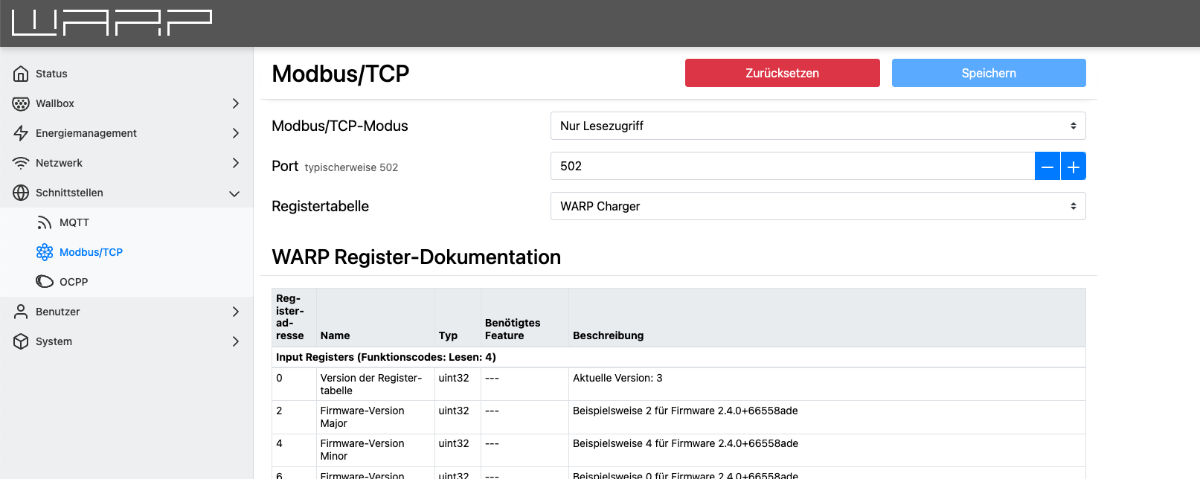
Problem: Ich kann die Modbus Register weder auslesen noch setzen. Modbus ist Firmware: 2.7.5+67bf44a8 (erstellt 26.02.2025 17:43:20, von Tinkerforge GmbH) Der nachfolgende Code bei den liefert Adressen 1002 und 1004 immer <Buffer 00 00 00 00> zurück, egal ob geladen wird oder nicht. Auch kann ich auf keine anderen Register zugreifen ("IllegalDataAddress"). Was mache ich falsch? // typescript 4.9.5 import modbus, { TCPStream } from 'modbus-stream' modbus.tcp.connect( 502, '192.168.178.55', { debug: '_' }, ( err: any, connection: TCPStream | undefined ) => { if ( err ) { console.error( err ) } else if ( connection ) { connection.readHoldingRegisters( { address: 1002, quantity: 4, }, ( err: any, data: any ) => { if ( err ) { console.error( err ) } else { const test = Buffer.from( data.response.data ) console.log( test ) } } ) } } )
Ich habe nichts gefunden, wie ich die Status-LED meiner WARP3 steuern kann. Ok, außer über die Automatisierung. Gibt es auch eine API dafür? Gruß, Guido